2017 · Competition
Creating an app for connected mobility
Combining electric vehicles, charging infrastructure and transport alternatives into a single app — designed for the moment your battery isn't enough.

My Role
What I did
Problem Statement
What happens when you can't make it?
The app was designed as an exercise to combine the electric mobility vehicles, the charging points and the other tools of transportation, all in one place. The use case was something as follows

"There is a person who owns an electric car and has to go to a faraway town for an important meeting. but there is not enough charge in the car. How do you solve this issue?"
Execution
From research to a working prototype
Research
The proposal started off with some secondary research; which included;
The ways EV batteries get charged at home vs at fast-charging stations
The way EV batteries perform during charging
EV apps for BMW, Chevy, Hyundai and Tesla were studied.
Google Maps were studied for what data is given when a trip is queried.

Brainstorming
This research was followed by creating a mind-map and some concept sketches

Approach
The solution was divided into three parts, viz. AVOID, CONTROL & CORRECT.

Avoid
Alert the user well in advance to put the car on charging beforehand
Control
Alert the user to leave early and charge on the way to the meeting
Correct
Get the user to the destination without the car — alternative transport
Solution — Avoid
Strategy 01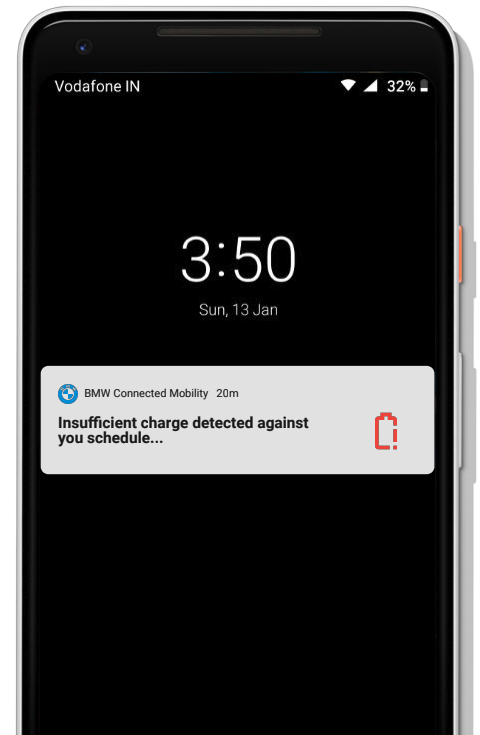
To avoid is to alert the user well in advance to put his/her car on charging beforehand. One way to achieve this is to allow the app to read the calendar entries, detecting the location of the meeting and then calculating the amount of charge needed. If the requirement is more than what is available, we alert the user with an 'un-swipeable' notification. this notification, in turn, should reflect on the internal pages as well
Solution — Control
Strategy 02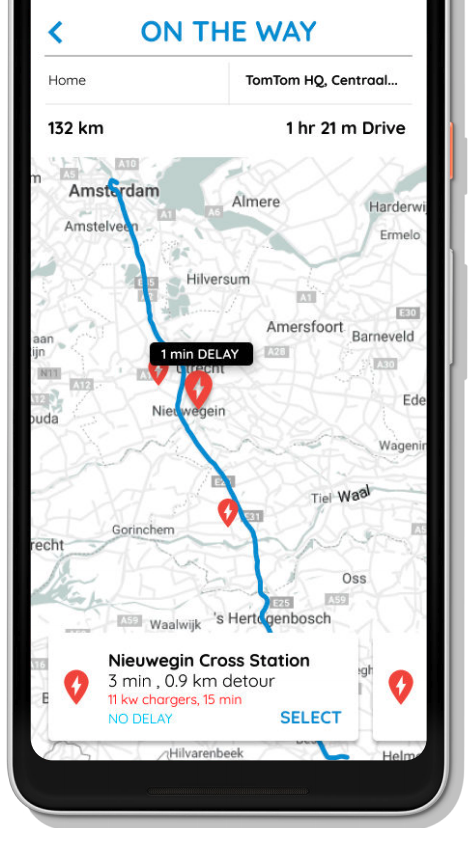
By control, the aim was to alert the user to leave a bit early and allow him/ her to charge the car on the way to the meeting while s/he grabs a bite to eat. This could be done by fetching the location and finding the optimally located charging station, with the minimum detour. Also, some calculation needs to be done regarding the charging time, detour time etc and the same should be considered while alerting the user. if this option is in play, the onboard computer will automatically navigate on the new route.
Solution — Correct
Strategy 03
By correct, the aim is to get the user to the destination, without the car. This can be achieved by deep integration between the transport booking aggregators like OMIO in Europe. This option should consider all the other options like car rental, bus, trains or in some cases, flights. The deep integration should allow the user to book the desired mode of transportation right from the app.
All three solutions should always be in play. all the options in the control part of the solution should be displayed irrespective of the cost, as long as they make sure that the user reaches the destination on time!
See the app in action
